
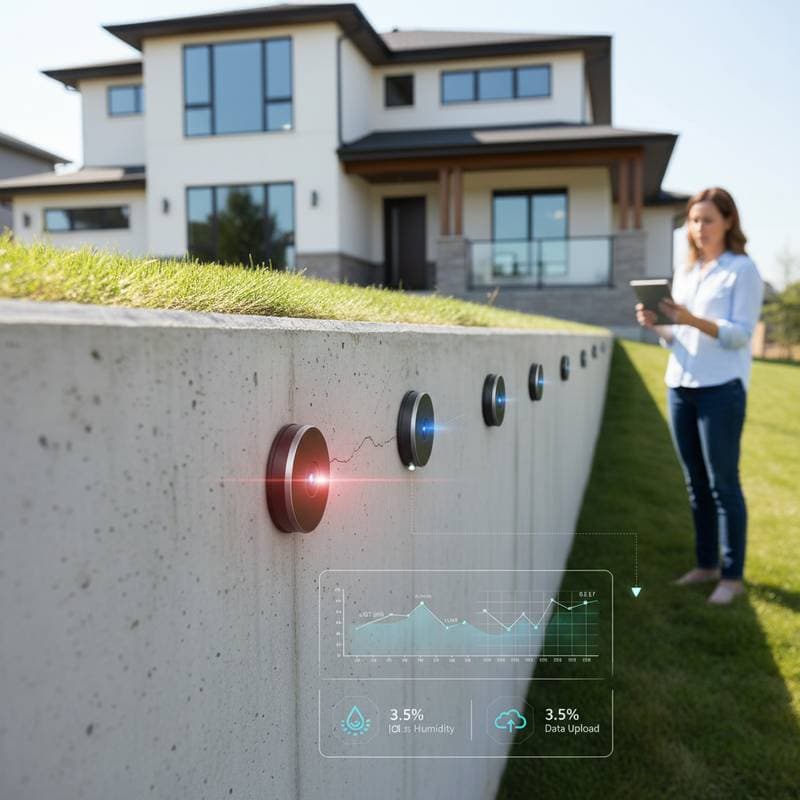
- Decision factor: Select between basic crack monitors and advanced systems that incorporate soil moisture and tilt detection for enhanced predictive analysis.
Planning Your Monitoring System
Evaluate your foundation type, local soil characteristics, and specific monitoring goals before acquiring sensors. Homes on clay-heavy soils, sloped terrain, or those with basement structures gain the most value from ongoing surveillance. This preparation ensures the system aligns with your property's unique needs and delivers reliable performance.
Permits and Code Considerations
In most areas, sensor installations qualify as non-invasive and wireless, so permits remain unnecessary. However, if integration with building automation or alarm systems occurs, verify adherence to local electrical regulations. Consult municipal guidelines to avoid any unforeseen compliance issues.
Cost and Budgeting
A standard setup for a single-family residence typically features four to eight sensors, a central hub, and software access. Hardware costs range from $700 to $2,000, while professional installation adds $400 to $1,200. Annual software subscriptions fall between $100 and $300, covering data analysis and alert features.
Opt for professional services to guarantee precise placement and calibration, particularly in complex environments. Individuals with technical confidence may handle installation independently using basic tools, achieving savings of 25 to 40 percent on labor expenses. Factor in long-term subscription costs when planning your overall budget.
Installing and Calibrating Sensors
Proper installation forms the foundation of effective monitoring. Follow these steps to position, secure, and activate your system for accurate data collection.
Step 1: Position Sensors Strategically
Locate sensors at critical load-bearing areas, corners, and along any existing fissures. For slab foundations, space units every 10 to 15 feet along perimeter walls. This distribution captures comprehensive movement patterns across the structure.
Step 2: Attach and Secure
Employ provided adhesive pads or screws for mounting. On concrete surfaces, drill 1/8-inch pilot holes as needed to accommodate fasteners. Confirm that each sensor sits flush against the surface and remains level to ensure precise readings.
Step 3: Connect to the Hub
Activate the central hub and pair sensors via the manufacturer's mobile application. Label each unit by its specific location, such as "north wall" or "garage corner," for easy identification in reports. This step establishes seamless communication within the network.
Step 4: Calibrate Baseline Readings
During calibration, the system captures initial position and moisture levels to define a reference point. Allow the process to complete without disturbances for optimal accuracy. With baseline data established, monitoring commences, sending alerts for deviations like shifts exceeding 0.05 inches or tilts beyond 5 degrees.
Troubleshooting Common Issues
Occasional challenges arise in sensor systems, but systematic resolution maintains reliability. Address problems promptly to sustain uninterrupted surveillance.
False Movement Alerts
Thermal expansion in concrete or wooden elements from temperature changes may generate minor false positives. Gradually refine alert thresholds to filter out insignificant variations while capturing genuine concerns. Monitor patterns over several days to fine-tune settings effectively.
Connection Dropouts
Signal disruptions often stem from weak Wi-Fi coverage or metallic interference near the hub. Implement mesh networking or Ethernet wiring to bolster connectivity. Test signal strength in the app and reposition the hub if necessary for consistent performance.
Inaccurate Moisture Readings
Accumulated dust or residues on probes can distort moisture data. Wipe probes clean with a dry cloth and perform recalibration through the application. Regular cleaning prevents ongoing inaccuracies and preserves measurement integrity.
Battery Depletion
Diminished battery levels lower data transmission rates. Monitor voltage via the dashboard and replace or recharge units when levels fall below 2.8 volts. Proactive battery management extends system longevity and ensures timely alerts.
DIY or Professional Installation?
The choice between self-installation and hiring experts depends on your home's condition and technical comfort. Weigh these factors to select the best approach for your situation.
Hire a Professional When
- Active cracks or floor unevenness appear in your home.
- Soil composition includes significant clay or expansive materials.
- Integration with current home automation setups proves necessary.
- Insurance requirements demand certified installation documentation.
Professionals bring expertise in challenging scenarios, reducing risks of improper setup. For straightforward installations, DIY methods suffice and offer cost efficiencies.
Pro Tips for Long-Term Success
Establish baseline measurements right after setup and archive them in a secure location for reference. Begin with cautious alert thresholds, refining them as data accumulates to match your property's behavior. Combine foundation sensors with complementary devices for gutters and indoor humidity to create a holistic moisture control plan.
Examine monthly trend graphs to spot emerging patterns early. Ensure the monitoring app stays current and grant access to relevant family members for shared oversight. These practices maximize the system's protective benefits over time.